Reorder commits
| Time to read: | Activity duration: |
|---|---|
| 10 minutes | 20 minutes |
Overview
Git will let you rewrite history so that you can make it more readable.
This is also the only way to combine two commits that are separated by others in the history.
As any other history manipulation, this must be done with care.
Setup playground
From the clone root, run the following script:
./scripts/create-playground.sh rebase-int_reorderCheck that you have a proper history in this playground repository.
WARNING
As playground rebuild a new repository each time you create one, the SHA1 in this course are only example. Only consider those in your local repository as reference.
cd playgrounds/rebase-int_reorder ; git log --onelineb443257 (HEAD -> main) fix bug
eada9d7 add debug to enqueue/dequeue
6dd3b5a implement size
d17c5a9 implement dequeue
6c3a3ba implement enqueue
2c5a050 add test for queue size
aadf1ba add test for dequeue on empty queue
be7a199 add constructor and inner collection
9858ffd add more tests for `dequeue()`
2fff1e2 class skeleton
610a788 api use example for `dequeue()`
9885b4d api use example for `enqueue()`
087ab4e create file with draft specificationsActivity goal
This exercise will let you practice with the reordering capabilities of the interactive rebase.
It is split into two parts:
- Perform a simple reordering, without conflicts;
- Go through a more complex use case and handle conflicts.
At the end of these two exercises, you should be more comfortable with this powerful tool.
Simple Reordering
In this example there's few commits that could be reordered.
One first option could be to first move down all test writing to group them together. So the final log history would be clearly split in 3 sections:
- test writing
- implementation
- debug and fix (that could be cleared afterward)
Each group should contain the following commits:
Let define the following goal:
- test writing
2c5a050 add test for queue size
aadf1ba add test for dequeue on empty queue
9858ffd add more tests for `dequeue()`
610a788 api use example for `dequeue()`
9885b4d api use example for `enqueue()`
087ab4e create file with draft specifications- implementation
6dd3b5a implement size
d17c5a9 implement dequeue
6c3a3ba implement enqueue
be7a199 add constructor and inner collection
2fff1e2 class skeleton- debug and fix (that could be cleared afterward)
b443257 (HEAD -> main) fix bug
eada9d7 add debug to enqueue/dequeue
Just start the interactive rebase (-i is equivalent to --interactive). Starting point is the first commit in the repository create file with draft specifications.
git rebase -i 087ab4eYou code editor should launch.
Just reorder the lines of commit by moving down commits related to code implementation, and up those for test writing.
The video bellow showns how I used VSCode to move rows in the commit history for this example.
Once you have finished moving rows, you can safely save and close the file to apply the change.
Git should return in your Bash with a message like:
Successfully rebased and updated refs/heads/main.You can now verify that your history was properly updated.
git log --oneline0f639f5 (HEAD -> main) fix bug
91e9db8 add debug to enqueue/dequeue
65f1224 implement size
f682de6 implement dequeue
45a8a06 implement enqueue
b00da3f add constructor and inner collection
6ee0d9f class skeleton
c097c8d add test for queue size
3016e22 add test for dequeue on empty queue
8bb0278 add more tests for `dequeue()`
610a788 api use example for `dequeue()`
9885b4d api use example for `enqueue()`
087ab4e create file with draft specificationsAs long as you follow the natural order of commits, you should not face any difficulty.
But if you don't, the comes troubles.
Complex reorder
Changing commit order follows the same rules as time travel.
If you try to move a consequence before a cause you will create a timeline paradox. In the Git language, this translate to conflict.
Starting from the state of previous activity, let's see what appends if you try this kind of change.
You will invert two commits:
- "add constructor and inner collection"
- "class skeleton"
Start a new interactive rebase on the entire history:
git rebase -i $(git log --format='%h' --grep='create file')About command syntax
The command above is a bit more complex than our usual ones.
It uses the Bash syntax $() to execute a git log sub-command and feed its output as an argument to the main git rebase command.
The git log command is using the following arguments:
--formatdefines how the log output its result by only showing the searched commit SHA1 (%h)--grepasks to search for commit having a message containing create file, so we get the first commit in history.
Once in the editor, invert the two commits, as in the video example bellow:
Save the changes and close your editor. Git should give you back control in your shell, but with a warning notice:
Auto-merging queue-example.ts
CONFLICT (content): Merge conflict in queue-example.ts
error: could not apply b00da3f... add constructor and inner collection
hint: Resolve all conflicts manually, mark them as resolved with
hint: "git add/rm <conflicted_files>", then run "git rebase --continue".
hint: You can instead skip this commit: run "git rebase --skip".
hint: To abort and get back to the state before "git rebase", run "git rebase --abort".
hint: Disable this message with "git config set advice.mergeConflict false"
Could not apply b00da3f... # add constructor and inner collection
Understanding Git error message
This message explain that Git do not understand how to apply the changes in commit "add constructor and inner collection".
The previous state, commit "add constructor and inner collection", that was used as reference point is now missing.
So you now have some time paradoc, a conflict, that needs to be manually fixed.
If you open the source file you should see something like:
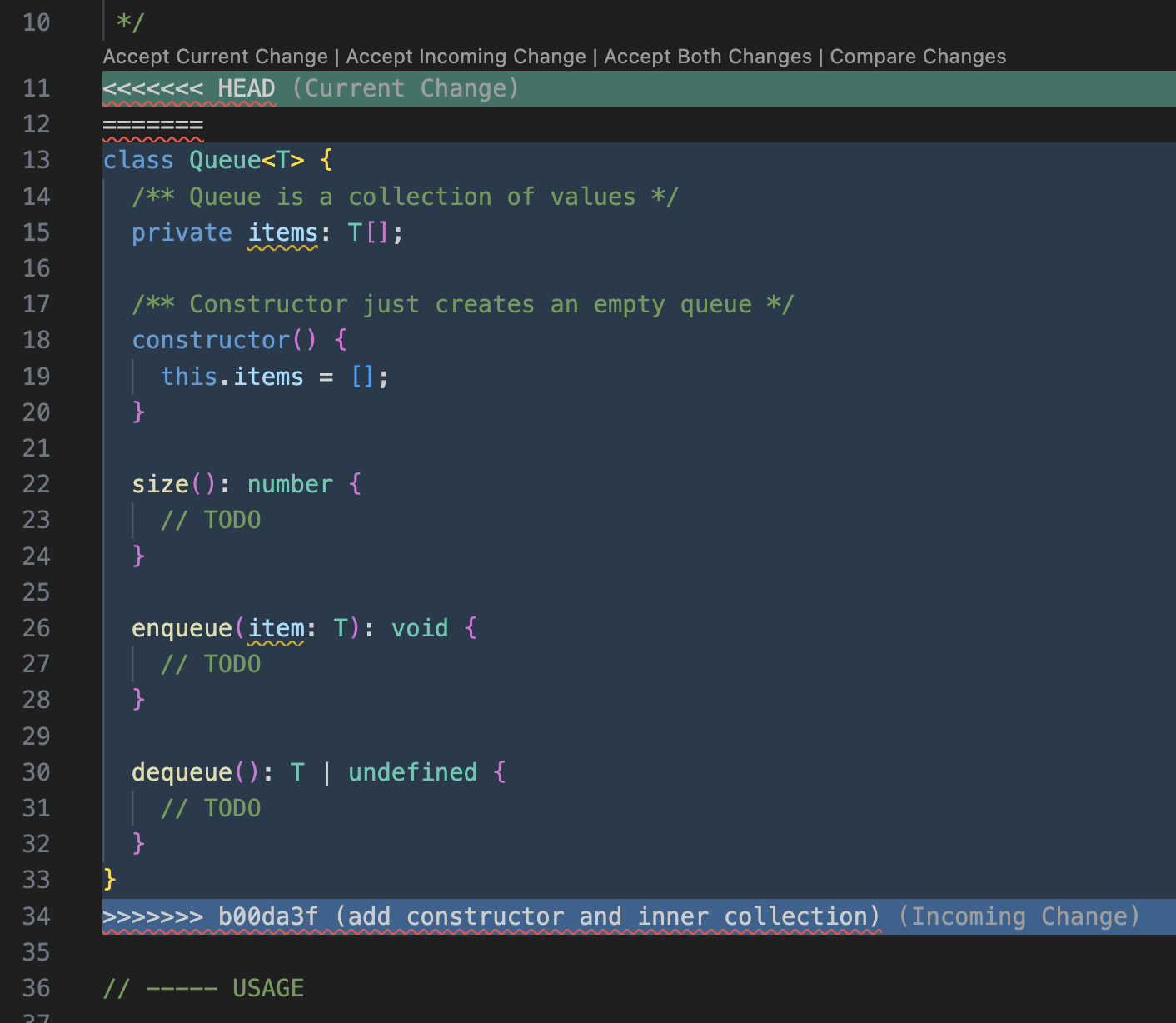
For this specific scenario you can accept incoming changes and let the rebase continue properly:
- flag the file conflict as resolved:
git add queue-example.ts- Ask rebase to continue:
git rebase --continue- You will be prompted to confirm the updated commit message in your editor. Save and close to let rebase continue.
And now you face a second conflict:
[detached HEAD aa0c23c] add constructor and inner collection
 1 file changed, 21 insertions(+)
Auto-merging queue-example.ts
CONFLICT (content): Merge conflict in queue-example.ts
error: could not apply 6ee0d9f... class skeleton
hint: Resolve all conflicts manually, mark them as resolved with
hint: "git add/rm <conflicted_files>", then run "git rebase --continue".
hint: You can instead skip this commit: run "git rebase --skip".
hint: To abort and get back to the state before "git rebase", run "git rebase --abort".
hint: Disable this message with "git config set advice.mergeConflict false"
Could not apply 6ee0d9f... # class skeleton
Git is now complaining again because the commit predecessor is no longer matching the previous comparison point. So you need to fix again this conflict by hand.
Open your editor. You should see the following:
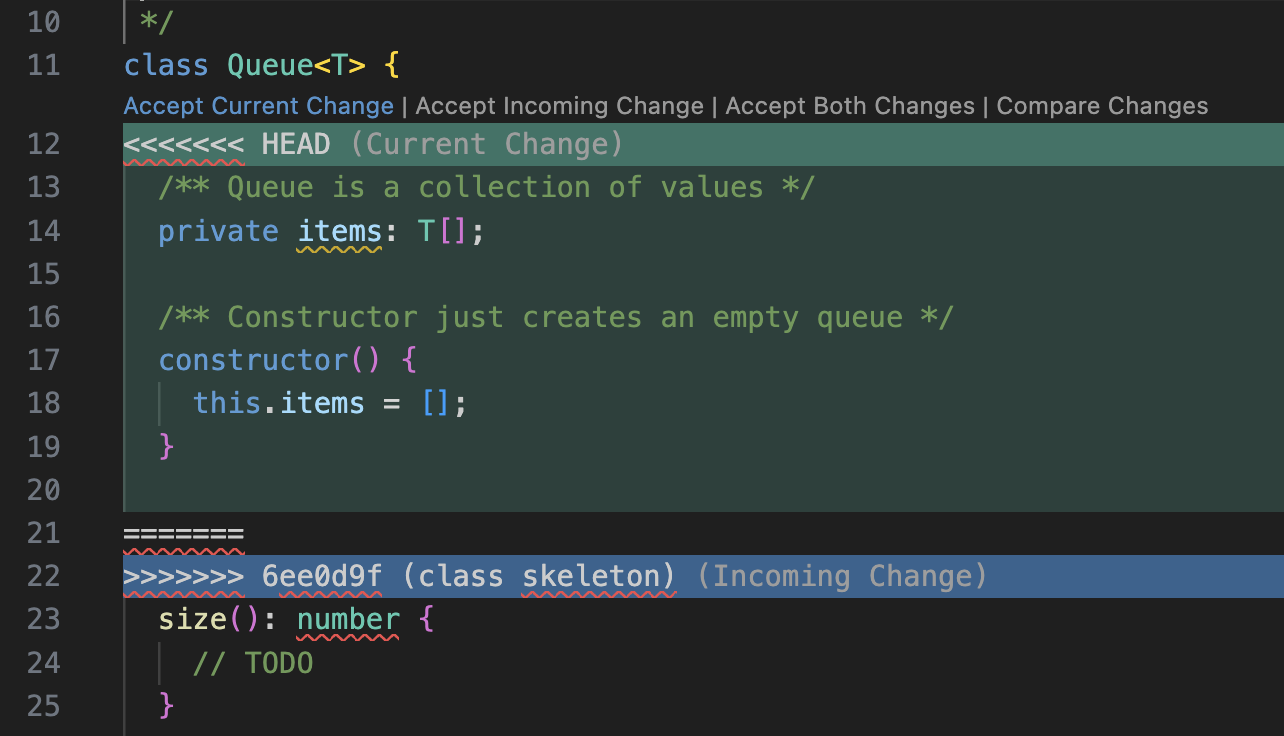
In this scenario you now have to pick current changes to introduce back the constructor and core properties of your class.
Once conflict is resolved, you can continue as in previous step:
- flag the file conflict as resolved:
git add queue-example.ts- Ask rebase to continue:
git rebase --continue- You will be prompted to confirm the updated commit message in your editor. Save and close to let rebase continue.
Now you should have no other conflicts and Git will return with a simple success notice:
Successfully rebased and updated refs/heads/main.What we learned
In this section we've learned how to reorder commits in the git log history.
You've seen that this is straightforward process as long as you preserve the natural ordering of related changed.
But as soon as you change this natural ordering, you will have to face and solve conflicts manually.
Personal advise
Don't mess with timeline. Just use reorder to enable other rebase action, such as squash and fixup.
When it really make sense to reorder some commits, alway create a backup branch where original history will be preserved.