Drop a commit
| Time to read: | Activity duration: |
|---|---|
| 10 minutes | 20 minutes |
Overview
Name says it all. Yes, you can just delete de commit from your history.
This is especially useful if you just need to remove a small commit introduced to add debug traces.
Setup playground
From the course repository root, run the following commands:
./scripts/create-playground.sh rebase-int_dropCheck that you have a proper history in this playground repository.
cd playgrounds/rebase-int_drop ; git log --onelinee517054 (HEAD -> main) fix computation
31cf050 add debug
146d7be implement Fibonacci computation
9254f1d debug array print
4f3d68d implement the print of list
734bed5 draft for main class and internal APIActivity goal
WARNING
As playground rebuild a new repository each time you create one, the SHA1 in this course are only example. Only consider those in your local repository as reference.
You probably spotted the specific item that we want to remove from this git log to have a clean code:
b2f871f (HEAD -> main) fix computation
a4946a2 add debug
f564099 implement Fibonacci computation
12b1f37 debug array print
d9f0ed5 implement the print of list
9dc4c77 draft for main class and internal API
If we trust the commit messages it seems we have two commits that should probably be removed before pushing:
- add debug
- debug array print
A simple cleanup
Check commit content
At first, we are going to focus on the very first (chronolocally) commit:
- debug array print
We can easily check this commit content with the command:
WARNING
In the command bellow, make sure to use the SHA1 in your repository that match the commit message, not the one from this example.
git diff d9f0ed5..12b1f37diff --git a/Main.java b/Main.java
index 3dfbc8c..8d0b71c 100644
--- a/Main.java
+++ b/Main.java
@@ -11,6 +11,10 @@ public class Main {
public static void main(String[] args) {
printSuite(5);
printSuite(39);
+
+ // DEBUG
+ List<Long> test = Arrays.asList(1L, 4L, 8L);
+ printArray(test);
}
// OUTPUT❓ About git diff
When you need to check the changes performed in a single commit, you need to run the diff command between the commit predecessor and the commit itself.
In my case:
- d9f0ed5 preceding commit (implement Fibonacci computation)
- 12b1f37 is the commit to check (add debug)
So needs to be done on d9f0ed5..12b1f37.
This commit is quite simple: three lines were added to test the list display function.
Delete this commit
So to remove the first debug commit we have to rewrite history starting from commit 12b1f37 up to the HEAD.
Run the command:
git rebase --interactive 12b1f37^TIP
Note that we specified the commit to be removed with a trailing ^. This is a short way to refer to its parent commit.
Without this ^, the commit would not be included in the rebase.
Your editor will opened a git rebase sequence as bellow:
pick 12b1f37 # debug array print
pick f564099 # implement Fibonacci computation
pick a4946a2 # add debug
pick b2f871f # fix computation

# Rebase d9f0ed5..b2f871f onto d9f0ed5 (4 commands)
#
# Commands:
# p, pick <commit> = use commit
# r, reword <commit> = use commit, but edit the commit message
# e, edit <commit> = use commit, but stop for amending
# s, squash <commit> = use commit, but meld into previous commit
# f, fixup [-C | -c] <commit> = like "squash" but keep only the previous
#                    commit's log message, unless -C is used, in which case
#                    keep only this commit's message; -c is same as -C but
#                    opens the editor
# x, exec <command> = run command (the rest of the line) using shell
# b, break = stop here (continue rebase later with 'git rebase --continue')
# d, drop <commit> = remove commit
# l, label <label> = label current HEAD with a name
# t, reset <label> = reset HEAD to a label
# m, merge [-C <commit> | -c <commit>] <label> [# <oneline>]
#         create a merge commit using the original merge commit's
#         message (or the oneline, if no original merge commit was
#         specified); use -c <commit> to reword the commit message
# u, update-ref <ref> = track a placeholder for the <ref> to be updated
#                       to this position in the new commits. The <ref> is
#                       updated at the end of the rebase
#
# These lines can be re-ordered; they are executed from top to bottom.
#
# If you remove a line here THAT COMMIT WILL BE LOST.
#
# However, if you remove everything, the rebase will be aborted.
#
TIP
You need to note two important points about rebase sequence:
- commits are ordered in chronological order, from oldest to newest, which is the opposite to the display of
git logcommand. - each line is in three parts:
- an action to perform
- the SHA1 followed by
# - the commit message :::
So, we want to remove the commit shown on the fist line. We have three options:
- just delete the line in the file;
- replace pick with drop to tell rebase to remove this commit;
- change pick to shorter d command to remove the commit.
We'll go the simple way and just remove the first line, the highlighted one, as follow:
pick f564099 # implement Fibonacci computation
pick a4946a2 # add debug
pick b2f871f # fix computation
Save and close the file and going back to your shell, you should see a message like:
Successfully rebased and updated refs/heads/drop2.Verify your history:
git log --onelinee0d78ad (HEAD -> main) fix computation
6b41b76 add debug
b1099e6 implement Fibonacci computation
d9f0ed5 implement the print of list
9dc4c77 draft for main class and internal APIYou just removed a debug commit from your history!
That was simple. We can do a bit more complex use case…
One step further
It's time to check for the add debug commit.
Check the commit content
Let's check the content of this commit.
WARNING
In the command bellow, make sure to use the SHA1 in your repository that match the commit message, not the one from this example.
git diff -p b1099e6..6b41b76diff --git a/Main.java b/Main.java
index 2a692c3..0018eb8 100644
--- a/Main.java
+++ b/Main.java
@@ -53,10 +53,16 @@ public class Main {
if ( 0 == n ) {
result = value1;
+ // DEBUG
+ System.out.printf("Item: %d -> %d\n", n, value1);
} else if ( 1 == n ) {
result = value2;
+ // DEBUG
+ System.out.printf("Item: %d -> %d\n", n, value2);
} else {
Long next = value1 + value2;
+ // DEBUG
+ System.out.printf("Item: %d -> %d\n", n, next);
result = fibonacci(n - 1, value1, next, accumulator);
}Ok, the commit message is not lying. We can drop this commit and remove these debug logs.
Delete this commit
Looking the log, the commit we want to remove is the penultimate commit of the log.
We are not going to rewrite entire log history. We only need to edit the last 2 commits.
git rebase -i HEAD~2TIP
Note that as we define the interval as relative to the HEAD of the branch.
Using HEAD~2 indicates that we edit the 2 commits starting from the HEAD of the branch.
Now VSCode should open with interactive rebase actions:
pick 6b41b76 # add debug
pick e0d78ad # fix computation

# Rebase 146d7be..e517054 onto 146d7be (2 commands)
#
# Commands:
# p, pick <commit> = use commit
# r, reword <commit> = use commit, but edit the commit message
# e, edit <commit> = use commit, but stop for amending
# s, squash <commit> = use commit, but meld into previous commit
# f, fixup [-C | -c] <commit> = like "squash" but keep only the previous
#                    commit's log message, unless -C is used, in which case
#                    keep only this commit's message; -c is same as -C but
#                    opens the editor
# x, exec <command> = run command (the rest of the line) using shell
# b, break = stop here (continue rebase later with 'git rebase --continue')
# d, drop <commit> = remove commit
# l, label <label> = label current HEAD with a name
# t, reset <label> = reset HEAD to a label
# m, merge [-C <commit> | -c <commit>] <label> [# <oneline>]
#         create a merge commit using the original merge commit's
#         message (or the oneline, if no original merge commit was
#         specified); use -c <commit> to reword the commit message
# u, update-ref <ref> = track a placeholder for the <ref> to be updated
#                       to this position in the new commits. The <ref> is
#                       updated at the end of the rebase
#
# These lines can be re-ordered; they are executed from top to bottom.
#
# If you remove a line here THAT COMMIT WILL BE LOST.
#
# However, if you remove everything, the rebase will be aborted.
#
We want to remove the debug commit, so you have to change the file as follow:
d 6b41b76 # add debug
pick e0d78ad # fix computation
INFO
In this second example we are using the abbreviated "d" command for drop action.
Save and close the file.
The shell will give you pack the prompt, but a message should warn you that there's a conflict for the rebase:
Auto-merging Main.java
CONFLICT (content): Merge conflict in Main.java
error: could not apply e0d78ad... fix computation
hint: Resolve all conflicts manually, mark them as resolved with
hint: "git add/rm <conflicted_files>", then run "git rebase --continue".
hint: You can instead skip this commit: run "git rebase --skip".
hint: To abort and get back to the state before "git rebase", run "git rebase --abort".
hint: Disable this message with "git config set advice.mergeConflict false"
Could not apply e0d78ad... # fix computation
Open the Main.java source in VSCode and resolve conflict:
In this particular example you need to:
- accept inco,in changes that include the fix commit;
- remove manually the debug log.
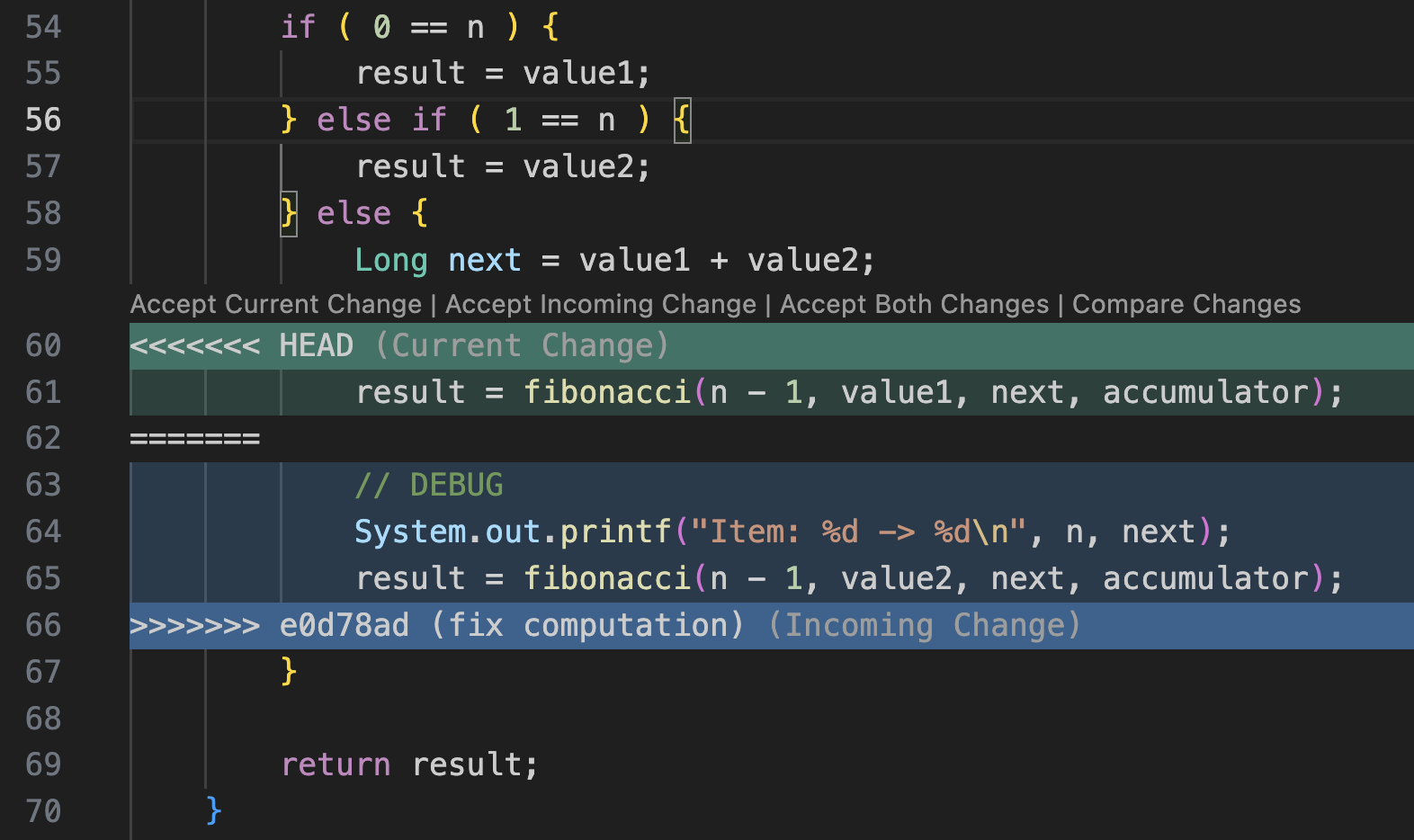
Final code should look like:
        } else {
            Long next = value1 + value2;
            result = fibonacci(n - 1, value2, next, accumulator);
        }
It's now time to complete the rebase.
# Stage file after conflict resolution
git add Main.java
# and finaliwe the rebase
git rebase --continue
Rebase will open the editor to allow you to edit last commit message. There's no update to do, so just close the file.
Rebase should complete with success with a message like:
[detached HEAD ce7881f] fix computation
 1 file changed, 1 insertion(+), 1 deletion(-)
Successfully rebased and updated refs/heads/main.
Check the updated log history.
git log --onelinece7881f (HEAD -> main) fix computation
b1099e6 implement Fibonacci computation
d9f0ed5 implement the print of list
9dc4c77 draft for main class and internal APIYour history is now looking much more nice and your code will be more pleasant to review.
What we learned
In this activity we re-wrote a branch history to remove two commits:
- a simple drop without conflict;
- a more comple drop requiring manual conflict solving.
A simple drop requires no specific effort.
As soon as manual merge is needed it can be tricky to solve a conflict.