Introduction
| Time to read: |
|---|
| 4 minutes |
What is this course about?
This repository is an activity driven set of short tutorials to improve your skills with the Git version management system.
It proposes an interactive way to play with Git more advances features such as worktrees and interactive rebase.
If worktrees are a quite simple concept to embrace, interactive rebase can be ,uch ,ore intimidating.
I hope this course will bring you confidence when using those Git features.
Pre-requisite
You should be familiar with basic Git commands.
It makes little sense to dive into the power-user world if you don't know the basics.
Your Editor
Your editor is your choice.
You can use vi, emacs, or any other. This has no impact on the outcome.
Most activities are designed to be done in a command-line interface, typically your favorite Bash or Zsh. So, console-friendly editors are not an issue.
This being said, we need a common ground for the examples. So, VSCode is a reasonable option.
Through this course content, I will assume you are using VSCode. So, remember to mentally replace references to code or VSCode with your editor of choice.
TIP
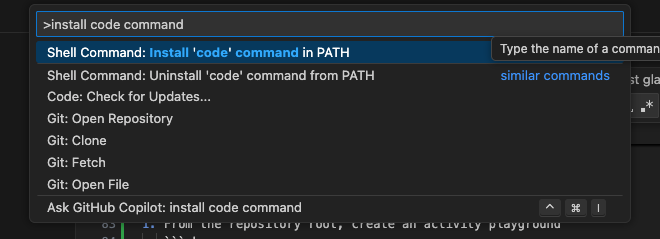
On macOS, you need to configure your PATH to include the code command that invokes VSCode from your shell.
This is done from VSCode itself. Just press the Shift + Command + P and in the prompt, search for "install code command in PATH"
Git configuration
Your editor
There are two ways to tell Git which editor you prefer to use:
- define and export
GIT_EDITORshell variable - use the Git configuration
Variable
To use the environment variable solution, you just need to run the command:
export GIT_EDITOR="code --wait"This will tell Git to run VSCode and wait for it to close the edited file before continuing.
Configuration
A simpler solution is to change Git global configuration:
git config --global core.editor "code --wait"WARNING
Throughout this course, I will assume that you changed the Git configuration to use your editor of choice.
I won't recall each time to configure your editor.